Smart home datasets and a realtime Internet-connected home

When designing an algorithm or as a means  to justify an approach you have  pursued in your research you need at some point empirical data.  In the case of the IoT, more specifically when it comes to smart homes, there is a lack of open-source datasets available for public access and unfortunately some of them disappear (from the Internet) after being active for a couple of months. My preferred collection of smart home datasets are developed and curated by Washington State University. In particular, I am referring to the  Centre for Advanced Studies in Adaptive Systems (CASAS) smart home project.
 
CASAS  is a multi-disciplinary research project focused on creating an intelligent home environment by using IoT technologies such as sensors and actuators. This same team has developed in its recent research the “smart home in a box”, which is a lightweight smart home design that has been installed in 32 homes to capture the participants interactions.
 
The link to access CASAS datasets is: http://casas.wsu.edu/datasets/. Datasets included consist mainly of ADL activity data of single/two/multi-resident apartments. Some of the datasets are fully annotated with some of them going back to 2007 (and still running) and spanning different countries from Europe to Asia.
 
 Some other useful datasets; highly cited in scholarly publications; that are also featured on CASAS’ website are:
 
In case you are not satisfied with the datasets identified here you can also consider two generic sites, working similar to a search engine, but for datasets. I am referring specifically to: DataHub and Google datasets.
 

An Internet-connected home in the Netherlands.

Now, if you want to take a peek at a cool smart home setup in the Netherlands displaying its captured and processed data in realtime on the Internet take a look at https://www.bwired.nl/index.asp
 
If you need any information about smart homes or related just get in touch 🙂
Organizing research articles

Whether you work as a researcher, student, or industry professional you may at some point in your career or in your studies have to carry out research.  This can be example to draft a report on a particular technology product (e.g., discussing the pros/cons of upgrading your platform from PHP to Javascript) or for instance to compile a scientific journal article (e.g., an article that discusses IoT state-of-the-art security challenges and opportunities).  When it comes to this a number of tools can be leveraged.  Here, I focus specifically on research article management.

The crude way is to directly download research articles from a scientific database such as IEEE, ACM, or ScienceDirect, and then simply to store the files inside a folder, e.g., titled “research” or more specifically under a sub-folder named after the article theme, e.g., “differential_privacy”.  There are other, perhaps better, ways of organizing these, for instance, by publication date, research authors, tags, or some combination of this, and so on.  While this may work, especially for small research projects, your folder structure can become pretty cumbersome for large projects – in particular those involving 100s of files. Here, one key thing is how to retrieve the articles pertaining to your topic of writing, and later how to reference them.  Yes, you may rely on the operating system indexing tools sometimes (e.g., Spotlight indexing on Mac) or on some other program (e.g., Evernote) but that may not be enough.  Example, how can you categorize the information further, e.g., tagging articles, adding search terms, assigning a rating score, etc. Here, a nice tool that can come to the rescue is a free software called Mendeley.

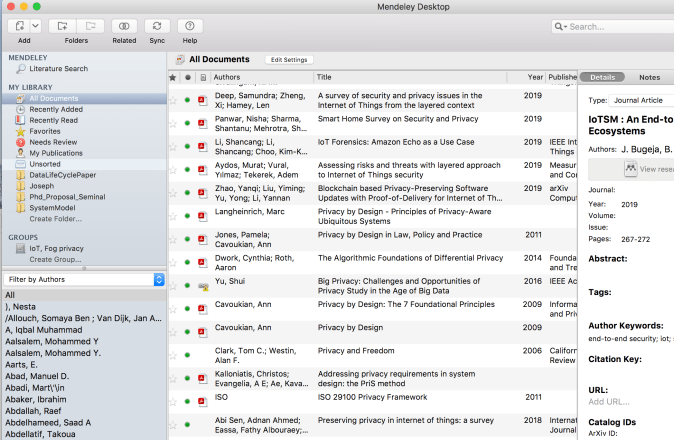
A snapshot of Mendeley Desktop illustrating different research articles and their organization into separate folders (inc. shared groups for collaborative work).

Mendeley is a program for managing and sharing research papers, discovering research data, and collaborating online. Through its browser extension (Mendeley Importer) with a click of a button you can also have the file automatically downloaded inside its database. The advantage of this is that then you can easily retrieve the file by searching for text also inside the actual PDF file and also by using other structures such as notes,  publication date, authors, etc. Mendeley also makes it easy to reference research articles (…and if you are using Ms. Word or LibreOffice you can also have your bibliography automatically managed and generated through Mendeley’s plugins). Another cool feature about Mendeley is that you can also create shared groups where you can share part of your library with your colleagues and work collaboratively.  Here, you can also annotate and comment on the actual articles using Mendeley’s built-in PDF editor.  This is pretty cool (although two cons are that you cannot, at least easily, export highlighted text as you can do in Skim PDF editor for instance; and that unfortunately a pen, e.g., Apple pencil, which is ideal for sketching some notes or diagram, is not supported at least in the free version ). Finally, in case your Mendeley database gets corrupted or your machine gets stolen or slammed, you can quickly recover your data by having your local account sync with Mendeley’s cloud (just remember: to keep your password safe and in case your machine is compromised to change your password immediately!).

Naturally, there is no tool that fits the need of everyone. In my case, I tried out many other tools but Mendeley seems to be my favourite so far especially for reference management and collaborative work.